
Floppy 1 & 2
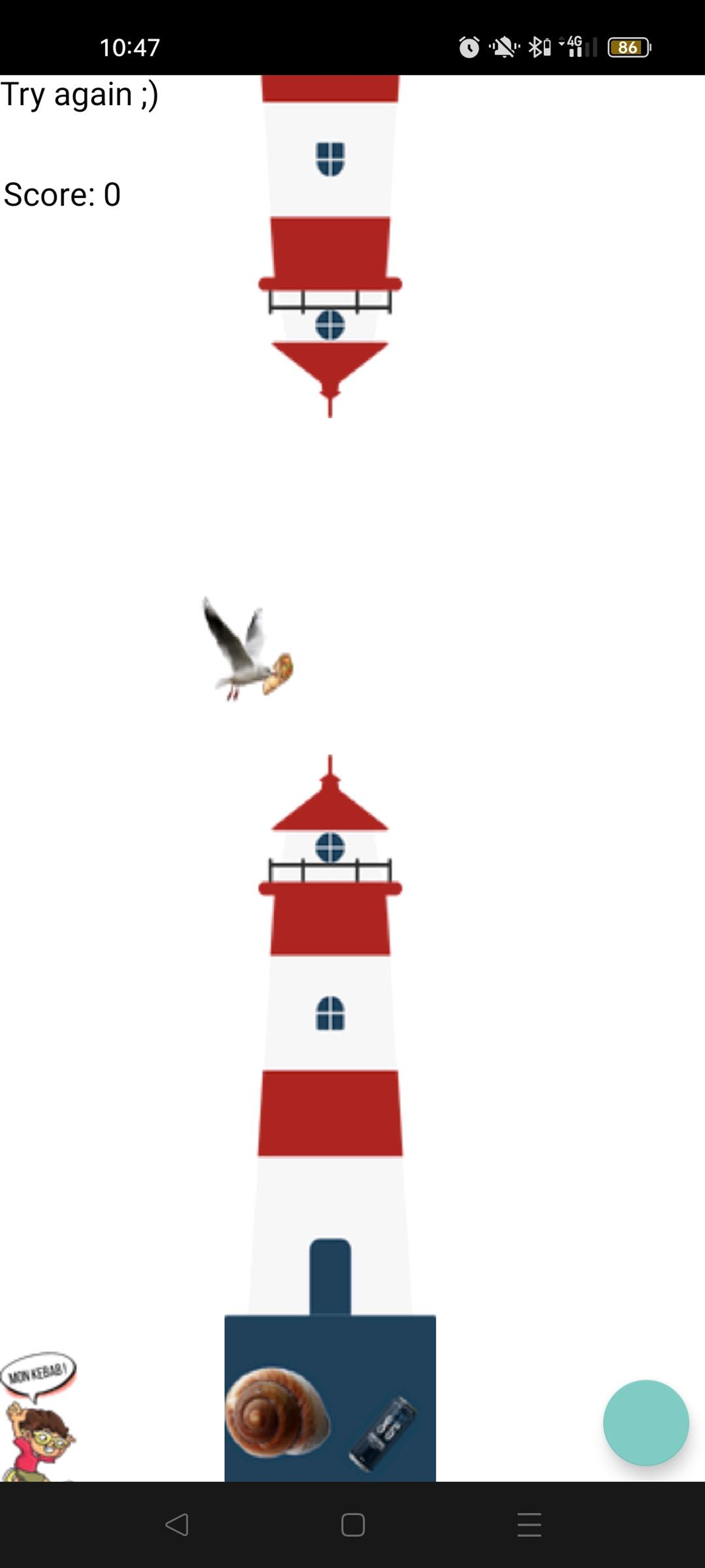
| The Floppy 1 and 2 challenges are Android challenges featured at Breizh CTF 2022. They are based on a single mobile application similar to the famous game Flappy Bird.
The application provided was the following: game.apk |
|
APK and Anti-Root
APK Architecture
Android applications in APK format are archives containing a set of files (compiled classes and packages, certificates, checksums, licenses, …).
The classes.dex file included in these archives contains all the compiled classes required for the application to work. As shown in the diagram below, it is generally the result of a compilation chain into Java bytecode and then into Dalvik bytecode.
Figure 1 - Simplified diagram of an APK archive
Several tools allow the decompilation of dex files. Notably through the smali language, which allows a simplified reading of Dalvik bytecode.
Most of the time, Android applications are developed in Java, and tools such as dex2jar, jd-gui, or jadx can offer a conversion of the APK archive into browsable source code. It is however important to note that these tools have certain limitations and do not reconstruct the original source code (variable names are generally changed, and some mechanisms are sometimes obfuscated).
Jadx-GUI
Loading the application in APK format into the jadx-gui tool lets us recover a more accessible navigation through the code:
Figure 2 - Loading the application in the Jadx tool
The application’s entrypoint is relatively easy to identify given the package name fishi.flappybird.
As stated on the jadx-gui website, the code is easily navigable and well suited to the reverse-engineering of APK-type applications: classes, methods and objects can be renamed and the propagation happens automatically across the whole code.
Anti-Root
We can observe a first “anti root” security measure at line 21. This mechanism generally serves to slow down dynamic analysis in virtual environments where the execution context could be monitored and/or altered.
Inspecting the commands lets us verify how the anti root mechanism works: it checks for the presence of a su or busybox binary on the file system, as well as the presence of the test-keys key in the android.os.Build.TAGS package.
Once renamed, the code looks like the following excerpt:
    public void onCreate(Bundle bundle) {
        if (this.protect.containt_test_keys() || this.protect.search_su_bin() || this.protect.su_exist() || this.protect.busybox_exist()) {
            startActivity(new Intent("android.intent.action.VIEW", Uri.parse("https://c.tenor.com/61bhySndZ_cAAAAd/nope-nope-button.gif")));
            Log.i("ROOT", "Root detected !!! Redirection in progress...");
            System.exit(0);
        } else {
            Log.i("ROOT", "Root not detected !");
        }
        super.onCreate(bundle);
        setContentView(R.layout.activity_main);
        m2210e().mo2107a().mo2028d(R.id.frame, new C0512f()).mo2029c();
    }
We quickly deduce that if the device satisfies the “root” detection conditions, the program’s execution is interrupted and a view of the following image is displayed:

Figure 3 - GIF displayed in case of a “root” environment
In the case where the phone is not rooted, lines 28 to 30 will launch the normal behavior of the application.
Main Program
The gameView class contains the core of the application. In particular we find the equivalent of the “main”: java.lang.Runnable.run():
Figure 4 - Contents of the gameView class in Jadx
A quick read of the code lets us identify the display of the score, its incrementation, as well as the collision detection of the “bird”.
The gameView class also contains an interesting method:
@Override // android.view.SurfaceHolder.Callback
public void surfaceCreated(SurfaceHolder surfaceHolder) {
    String l = Long.valueOf(System.currentTimeMillis() / 1000).toString();
    Log.i("Flag", C0509d.m797b(C0509d.m797b("GZMC]AuC5NTQD2WN4VVVD3ZMKLUBS6GF9UO:SGOIVz", C0509d.m798a(l.substring(0, 3))), l.substring(0, 5)));
    Canvas lockCanvas = surfaceHolder.lockCanvas();
    if (lockCanvas != null) {
        gameView.this.draw(lockCanvas);
        surfaceHolder.unlockCanvasAndPost(lockCanvas);
    }
}
By following the successive method calls, as well as the interface overrides, we realize that the method is called when the application is launched. It displays a log message labeled “Flag” through the android.util.Log feature. Unfortunately, the results of these log functions are not directly visible in the Android application. Moreover, the rights required to access these logs are specific and require setting up a debug environment that bypasses the anti-root mechanism.
Flag 1 - “Dynamic” Method
One of the ways to access the results of the Log method is to enable the USB debug mode on your phone and connect to it with the Android Debug Bridge tool, more commonly known as adb.
The following command lets us check the list of devices connected over USB.
$ adb devices

List of devices attached
163062a8        device
ADB also works with virtual environments, but these may not satisfy the anti-root mechanisms.
I therefore chose to install the game.apk application on my personal phone.
In the case of a malware analysis, it is important to use appropriate, dedicated hardware and to take into account the risk of detection by an attacker.
The adb logcat command then displays the device’s logs in real time.
We therefore run the command on our linux terminal, then the game.apk application on our phone.
$ adb logcat -b main | grep 'Flag'

04-05 11:23:43.427  1155  1155 I OplusLayer: setFlags AOD 1
04-05 11:23:59.404  1411  2615 D WindowManager: interceptKeyTq keycode=26 interactive=false keyguardActive=true policyFlags=2000000
04-05 11:23:59.530  1411  2615 D WindowManager: interceptKeyTq keycode=26 interactive=true keyguardActive=true policyFlags=22000000
04-05 11:23:59.601  1155  1155 I OplusLayer: setFlags AOD 0
04-05 11:23:59.857  1140 14538 D APM_AudioPolicyManager: getInputForAttr() source 1999, sampling rate 16000, format 0x1, channel mask 0x10, session 20833, flags 0 attributes={ Content type: AUDIO_CONTENT_TYPE_UNKNOWN Usage: AUDIO_USAGE_UNKNOWN Source: AUDIO_SOURCE_HOTWORD Flags: 0x800 Tags:  }, uid=10156
04-05 11:23:59.918  1031 26568 D msm8974_platform: platform_set_echo_reference:g_NoiseReduce_Aec_Flag = 0
04-05 11:24:01.597 14609 16590 I DiscoveryManager: Filter criteria(CC1AD845,CC32E753) scannerFlags(2)
04-05 11:24:04.863  1411  3324 D WindowManager: interceptKeyTq keycode=4 interactive=true keyguardActive=false policyFlags=2b000002
04-05 11:24:04.975  1411  6617 D WindowManager: interceptKeyTq keycode=4 interactive=true keyguardActive=false policyFlags=2b000002
04-05 11:24:05.059  7659 16762 I OpenGLRenderer: Davey! duration=147093ms; Flags=1, FrameTimelineVsyncId=7537123, IntendedVsync=195286173889985, Vsync=195286173889985, InputEventId=1379349935, HandleInputStart=195286174663991, AnimationStart=195286174667793, PerformTraversalsStart=195286174670137, DrawStart=195286191492689, FrameDeadline=195286207223317, FrameInterval=195286174638210, FrameStartTime=16666666, SyncQueued=195286191799512, SyncStart=195286191867272, IssueDrawCommandsStart=195286192076960, SwapBuffers=195286194316126, FrameCompleted=195433267530237, DequeueBufferDuration=886510, QueueBufferDuration=1119271, GpuCompleted=195433267530237, SwapBuffersCompleted=195286195985189, DisplayPresentTime=0,
04-05 11:24:11.552  9777  9777 I Flag    : BZHCTF{D0NT_F0RG3T_TH3_DEBUG_1NF0RM4TIONS}
04-05 11:24:12.782  1411  1513 D WindowManager: interceptKeyTq keycode=4 interactive=true keyguardActive=false policyFlags=2b000002
04-05 11:24:12.958  1411  1513 D WindowManager: interceptKeyTq keycode=4 interactive=true keyguardActive=false policyFlags=2b000002
We retrieve the character string (and thus the first flag):
I Flag : BZHCTF{D0NT_F0RG3T_TH3_DEBUG_1NF0RM4TIONS}Flag 1 - “Static” Method
The static method is undoubtedly the simplest method to use in this kind of context. Indeed, the flag seems to be stored in encrypted form in the surfaceCreated() method discussed earlier. By using code inspection, as well as jadx’s renaming and propagation feature, we obtain the following function:
@Override // android.view.SurfaceHolder.Callback
public void surfaceCreated(SurfaceHolder surfaceHolder) {
    String l = Long.valueOf(System.currentTimeMillis() / 1000).toString();
    Log.i("Flag", CryptoESNA.customXor(CryptoESNA.customXor("GZMC]AuC5NTQD2WN4VVVD3ZMKLUBS6GF9UO:SGOIVz", CryptoESNA.revString(l.substring(0, 3))), l.substring(0, 5)));
    Canvas lockCanvas = surfaceHolder.lockCanvas();
    if (lockCanvas != null) {
        gameView.this.draw(lockCanvas);
        surfaceHolder.unlockCanvasAndPost(lockCanvas);
    }
}
The CryptoESNA class is defined below:
public class CryptoESNA {

    /* renamed from: a */
    private String[] keys = {"jess000000eeica", "654300000021e", "mich000000ael", "ashl000000ey", "qwert000000y", "111100000011", "ilove000000u", "000000000000", "mich000000elle", "tigge000000r", "sunsh000000ine", "chocol000000ate", "password1", "soccer", "anthony", "friends", "butterfly", "purple", "angel", "jordan", "liverpool", "justin", "loveme", "fuckyou", "123123", "football", "secret", "andrea", "carlos", "jennifer", "joshua", "bubbles", "1234567890", "superman", "hannah", "amanda", "loveyou", "pretty", "basketball", "andrew", "angels"};

    /* renamed from: a */
    public static String revString(String str) {
        byte[] bytes = str.getBytes();
        byte[] bArr = new byte[bytes.length];
        for (int i = 0; i < bytes.length; i++) {
            bArr[i] = bytes[(bytes.length - i) - 1];
        }
        return new String(bArr);
    }

    /* renamed from: b */
    public static String customXor(String str, String str2) {
        byte[] bytes = str.getBytes();
        byte[] bytes2 = str2.getBytes();
        int i = 0;
        for (int i2 = 0; i2 < bytes.length; i2++) {
            byte b = bytes[i2];
            bytes[i2] = (byte) (bytes[i2] ^ bytes2[i]);
            i = (i + b) % bytes2.length;
        }
        return new String(bytes);
    }
}
The “keys” variable never seems to be used in the program.
To retrieve the Flag statically, we simply reimplement the methods in a Java file and replace the Log() method with the System.out.println() method.
I therefore wrote the following Flappy.java file:
public class Flappy{
  public static void main(String arg[]){

    String l = Long.valueOf(System.currentTimeMillis() / 1000).toString();
    l = "1648875600";  // J'ai reset la valeur correspondant à la date de l'evenement.
    System.out.println(Flappy.customXor(Flappy.customXor("GZMC]AuC5NTQD2WN4VVVD3ZMKLUBS6GF9UO:SGOIVz", Flappy.revString(l.substring(0, 3))), l.substring(0, 5)));

  }

  public static String customXor(String str, String str2) {
        byte[] bytes = str.getBytes();
        byte[] bytes2 = str2.getBytes();
        int i = 0;
        for (int i2 = 0; i2 < bytes.length; i2++) {
            byte b = bytes[i2];
            bytes[i2] = (byte) (bytes[i2] ^ bytes2[i]);
            i = (i + b) % bytes2.length;
        }
        return new String(bytes);
    }

  public static String revString(String str) {
      byte[] bytes = str.getBytes();
      byte[] bArr = new byte[bytes.length];
      for (int i = 0; i < bytes.length; i++) {
          bArr[i] = bytes[(bytes.length - i) - 1];
      }
      return new String(bArr);
  }
}
The compilation is then done with the javac command and the execution with java:
$ javac Flappy.java
$ java Flappy
BZHCTF{D0NT_F0RG3T_TH3_DEBUG_1NF0RM4TIONS}
We do indeed retrieve the first flag :).
Flag 2 - “Static” Method
No longer remembering the challenge statements, I simply continued my investigation of the mobile application with the Jadx tool. It seems to me, however, that the challenge description indicated that you had to exceed 35000 points.
One of the features present in reverse engineering tools is the reference search feature. Indeed, for a given variable, method, object or class, it is possible to ask Jadx to search for all references (right click —> “Find Usage”).
I therefore decided to look for the various calls to the encryption method (renamed here customXor):
Figure 5 - References of the customXor function in Jadx
We can thus see 3 results with the string GZMC]AuC5NTQD2WN4VVVD3ZMKLUBS6GF9UO:SGOIVz corresponding to the first flag. We also find 3 results for a different string: KSJAXHwP0P[V=ZW:D@Z]RPXJM\\ME[S[=NL_H>BE!s.
By double-clicking on the reference we come across the following class:
package p005b0;

import android.util.Log;

/* renamed from: b0.b */
/* loaded from: classes.dex */
public class C0507b {

    /* renamed from: a */
    public CryptoESNA f2134a = new CryptoESNA();

    /* renamed from: a */
    public String m804a(int i) {
        if (i < 35000) {
            return "Try again ;)";
        }
        String l = Long.valueOf(System.currentTimeMillis() / 1000).toString();
        String b = CryptoESNA.customXor(CryptoESNA.customXor("KSJAXHwP0P[V=ZW:D@Z]RPXJM\\ME[S[=NL_H>BE!s", CryptoESNA.revString(l.substring(0, 5))), l.substring(0, 5));
        Log.i("", b);
        return b;
    }
}
Once again, the static reverse engineering method is similar to that of the first part; only the key and the integer “3” change. We can therefore reconstruct the following Flappy2.java script:
public class Flappy2{
  public static void main(String arg[]){

    String l = Long.valueOf(System.currentTimeMillis() / 1000).toString();
    l = "1648875600";  // J'ai reset la valeur correspondant à la date de l'evenement.
    System.out.println(Flappy.customXor(Flappy.customXor("KSJAXHwP0P[V=ZW:D@Z]RPXJM\\ME[S[=NL_H>BE!s", Flappy.revString(l.substring(0, 5))), l.substring(0, 5)));

  }

  public static String customXor(String str, String str2) {
        byte[] bytes = str.getBytes();
        byte[] bytes2 = str2.getBytes();
        int i = 0;
        for (int i2 = 0; i2 < bytes.length; i2++) {
            byte b = bytes[i2];
            bytes[i2] = (byte) (bytes[i2] ^ bytes2[i]);
            i = (i + b) % bytes2.length;
        }
        return new String(bytes);
    }

  public static String revString(String str) {
      byte[] bytes = str.getBytes();
      byte[] bArr = new byte[bytes.length];
      for (int i = 0; i < bytes.length; i++) {
          bArr[i] = bytes[(bytes.length - i) - 1];
      }
      return new String(bArr);
  }
}
We recompile and run the script:
$ javac Flappy2.java
$ java Flappy2
BZHCTF{Y0UR_4_R3AL_TRY_HARDER_W3LL_D0NE!}
We are now in possession of the 2nd flag 😄!
Flag 2 - “Byte Patching” Method
The byte patching method consists in generating a new, slightly patched version of the APK. Analysis of the C0507b class indicates that the minimum score to display flag number 2 must be 35000. We will therefore replace this value 35000 with a lower value such as 0.
This method is divided into several steps:
- Decompress the APK
- Decompile the classes.dex file
- Modify the code (smali/class)
- Recompile the classes.dex file
- Recompute the integrity signatures (META-INF)
To make things easier, we will use the Apktool tool.
Let’s start by decompiling the APK and the dex file:
apktool d game.apkPatching the 35000 score
By opening the “game” folder generated by the apktool tool, we search for the value 35000. It does not seem to be present in the project. Its hexadecimal value 0x88b8, on the other hand, has a single reference:
Figure 6 - Retrieving the application’s 35000 value in VSCode
We then change this value to 0x0 and save the file.
We will now recompile the new APK using Apktool:
$ apktool b game -o game.apkAs mentioned earlier, APK archives work with a signature mechanism. Since we are not in possession of the key used to sign the application’s resources, we will generate our own signature and sign the application with it:
$ keytool -genkey -v -keystore my-release-key.keystore -alias alias_name -keyalg RSA -keysize 2048 -validity 10000

Ressaisissez le nouveau mot de passe :
Quels sont vos nom et prénom ?
  [Unknown]:  zeecka
Quel est le nom de votre unité organisationnelle ?
  [Unknown]:  zeecka
Quel est le nom de votre entreprise ?
  [Unknown]:  zeecka
Quel est le nom de votre ville de résidence ?
  [Unknown]:  zeecka
Quel est le nom de votre état ou province ?
  [Unknown]:  zeecka
Quel est le code pays à deux lettres pour cette unité ?
  [Unknown]:  FR
Est-ce CN=zeecka, OU=zeecka, O=zeecka, L=zeecka, ST=zeecka, C=FR ?
  [non]:

Génération d'une paire de clés RSA de 2 048 bits et d'un certificat auto-signé (SHA256withRSA) d'une validité de 10 000 jours
        pour : CN=zeecka, OU=zeecka, O=zeecka, L=zeecka, ST=zeecka, C=FR
[Stockage de my-release-key.keystore]
We can now sign the application with our key. The use of apksigner, jarsigner and/or zipalign may be necessary depending on the type of application and the device. To be honest, I did not have time to recompile an APK satisfying all the security conditions.
As an example, we will sign the APK with the jarsigner command:
$ jarsigner -verbose -sigalg SHA1withRSA -digestalg SHA1 -keystore my-release-key.keystore game.apk alias_name
Enter Passphrase for keystore:
 updating: META-INF/MANIFEST.MF
   adding: META-INF/ALIAS_NA.SF
   adding: META-INF/ALIAS_NA.RSA
...
We can now install our new application with adb:
$ adb install game.apkOpening the application with log inspection validates the 2nd flag from the very 1st point :) :
$ adb logcat -b main | grep 'BZH'
BZHCTF{Y0UR_4_R3AL_TRY_HARDER_W3LL_D0NE!}
Flag 2 - BONUS - Bypass 🤡
Analysis of the C0507b class indicates that the minimum score to display flag number 2 must be 35000. At a rate of one point every 2 seconds, it would take nearly 20h to solve the challenge legitimately.
This solution is however possible! (but does not fit within the 12h allotted for the CTF). Indeed, by clicking excessively, it is possible to pass over all the obstacles. An Android application such as Auto Clicker can be used to do the work for us:
Logically, after 20h of execution, we retrieve the character string (and thus the second flag):
$ adb logcat -b main | grep 'BZH'
BZHCTF{Y0UR_4_R3AL_TRY_HARDER_W3LL_D0NE!}
It is also conceivable to reduce the 35000 value with tools equivalent to CheatEngine, to directly increase your score, or to speed up the phone’s clock.
Zeecka